

Tracking Unfinished Purchase Attempts
Our system includes a useful feature that allows you to track all purchase attempts that were not completed by a user.
Whenever a user reaches the payment step during the booking process but, for any reason, does not finalize the booking (e.g., credit card denied, page closed, user clicked back, etc.), the system automatically saves that session as a Travel Idea.
How to access purchase attempts
To view these attempts:
- Go to the Back Office and navigate to Ideas & Users → Ideas.
- Activate the filter called “Purchase Attempts”.
- You will see a list of travel ideas with a standard title format that includes the date of the purchase attempt.
This section will display all purchase attempts across any booking engine.
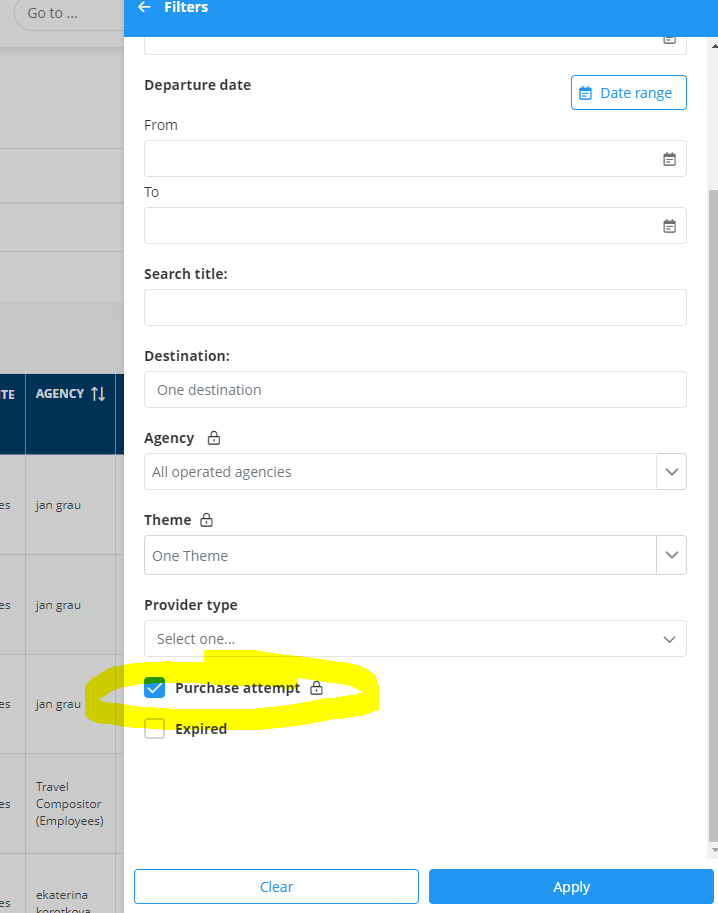
Viewing purchase attempts only for holiday packages
If you want to see only the purchase attempts from the Holiday Packages engine:
- Go to Ideas & Users → Holiday Packages.
- Apply the same filter: “Purchase Attempts”.
- The structure and behavior are the same.
How to view passenger details
To check the passenger data entered during the attempt:
- Open the Travel Idea related to the purchase attempt.
- Click on Quote to simulate the booking.
- When you reach the Passenger Data step, you’ll see all the information that the user had previously entered.
This functionality is especially helpful for contacting the client and helping them complete the booking.
Real-time alerts from notifications
You can also keep track of purchase attempts using the Notifications section in the Back Office:
- Go to Microsites → Notifications.
- Here you’ll find alert messages related to payment activity.
