

BO Bussines Inteligence section
How to Track Your Sales
Our platform provides operators with powerful tools to monitor and analyze the performance of their agency throughout the year. This is essential for making informed decisions and identifying sales trends.
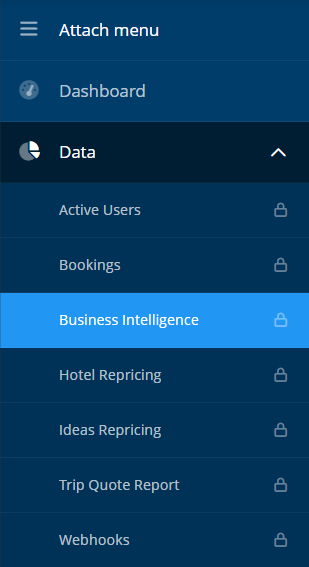
You can access all statistics by navigating to the “Data” → “Business Intelligence” section of the system
Types of Reports Available
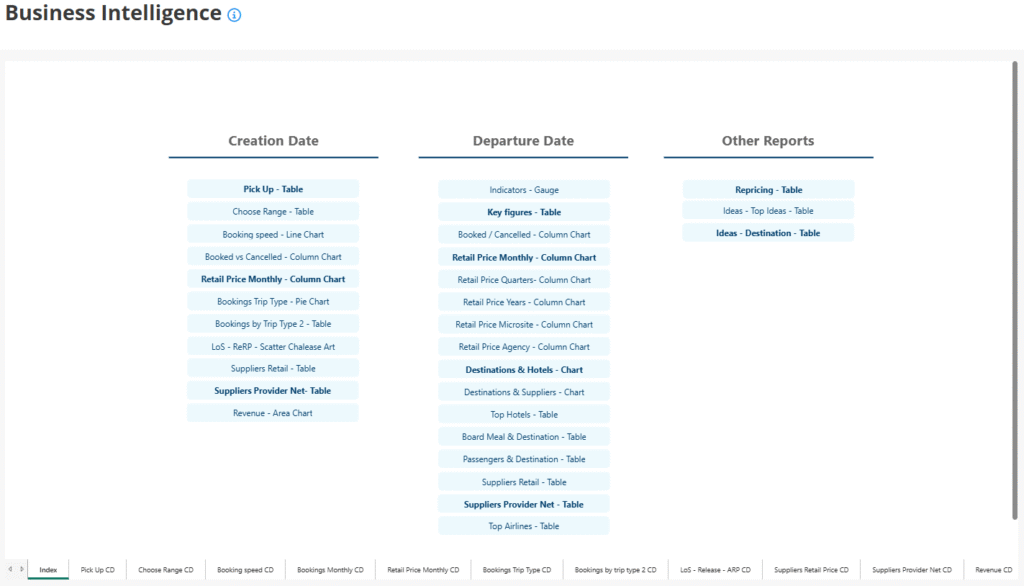
In this section, you’ll find various types of reports based on:
- Creation Date: Analyze sales based on when bookings were made.
- Departure Date: Track sales by when the trips actually occur.
- Other Custom Reports: These provide deeper insights into booking behavior.
Customizing the Data Search
Each report includes flexible filters that allow you to tailor the data to your needs. You can:
- Select a Microsite
- Choose one or more Agencies
- Apply various other filters such as:
- Destination
- Date range
- Product type (hotels, flights, transfers, etc.)
- Booking status (confirmed, cancelled, pending)
- Revenue breakdowns
The available parameters will vary depending on the type of report selected.
Why Use This Tool?
- Monitor your agency’s monthly and yearly evolution.
- Detect top-selling products or destinations.
- Compare performance across microsites or sub-agencies.
- Identify trends and peak periods to better plan marketing actions.
By leveraging these statistics, operators can stay one step ahead and focus on what really drives results.